How Many Keywords Per Pillar? Why a Fixed Article Quota Backfires in 2026
The question comes up constantly. A manager hands you a number, say fifty supporting articles per pillar, and now your job is to find fifty keywords good enough to justify fifty pages. So you hunt. And somewhere around keyword thirty-five the well runs dry, so you start padding the list with phrases that have zero traffic, just to reach the count.
That is the wrong order of operations. A pillar does not need a fixed number of articles. It needs enough articles to cover the topic completely, and that number is whatever the topic actually contains. Set the target first and you will always either run short and pad, or stop early and leave gaps. Find every relevant keyword first, and the right count falls out on its own.
The Quota Trap
A fixed article quota changes the question you are asking. Instead of “is this keyword worth a page?” you start asking “does this keyword get me closer to fifty?” Those are not the same question, and the second one quietly lowers your standards every time the count gets tight.
The failure mode is predictable. The first twenty keywords are strong because the obvious, high-intent terms are easy to find. The next twenty are thinner. The last ten are filler you would never have written if the number had not forced your hand. You end up with a pillar where a third of the supporting pages exist only to satisfy a spreadsheet, not a searcher.
What experienced practitioners keep saying
- They would never set out to find a specific number of keywords for a project. They find all the relevant ones, whatever that number turns out to be.
- Fewer high-quality keywords with real intent beat a longer list padded to hit a target.
- Group related long-tail variations into clusters and let the topic, not a quota, decide how many pages it supports.
- Using zero-traffic keywords just to reach a count is a sign the target was arbitrary in the first place.
Find All the Keywords, Not a Number
The healthier approach is to ignore the count entirely while you research. Take one pillar topic and find every relevant keyword it genuinely has. Some topics are deep and support sixty pages without strain. Others are narrow and run out of honest material at fifteen. Both are correct, because the topic decided, not a policy.
This sounds obvious and is hard to do in practice, because a number on a brief feels concrete and “cover the topic completely” feels vague. The fix is to make completeness measurable: build an exhaustive list, group it, and the natural groups become the page count. You are not guessing at “enough.” You are counting the real, distinct things people search inside the topic.
The Zero-Traffic Tax
Padding has a price, and it is not just wasted writing time. Every filler page dilutes the cluster around it. It splits internal links, competes with your stronger pages for the same vague intent, and tells Google your site covers a topic in breadth without depth. Thin pages do not sit there harmlessly; they drag.
There is one important distinction to keep straight. A keyword that reports zero volume is not automatically filler. Many long-tail phrases are searched too rarely for a tool to estimate, so they read zero even though real people type them, and those are often the easiest early wins. Filler is different: a keyword with no real demand and no real relevance, added only to reach a number.
Zero volume vs filler
The test is not the volume number. It is whether a real person, with a real reason, would type the phrase to solve a problem your page can answer. If yes, low volume is fine. If no, no volume number makes it worth publishing.
Relevance and Intent Are the Filter
When you stop optimizing for count, two filters do the work instead: relevance and search intent. Relevance asks whether the keyword belongs to this topic and this business at all. Intent asks whether the person searching it wants what your page offers. A keyword has to clear both before it earns a place on the list.
Run keywords through that filter and the list shrinks, then gets stronger. The terms that survive map to a specific searcher with a specific job, which is exactly the kind of page that ranks and converts. A shorter list of keywords you can serve well is worth far more than a padded one full of phrases you are only writing about because they were available.
Let Clusters Set the Article Count
Here is the part that turns “cover the topic” into an actual number. Take your full keyword list and group it by intent. Variations that want the same thing collapse into one page. Phrases that want different things split into different pages. When you finish grouping, the number of distinct groups is the number of articles the pillar honestly supports.
This is also how you avoid keyword cannibalization. Ten near-identical long-tails do not deserve ten pages; they deserve one page that targets all of them. Treating each keyword as its own article is what produces thin, overlapping posts that compete with each other. The Keyword Grouping Tool clusters a pasted list by shared intent so you can see those natural groups before you commit anything to a content calendar.
From a flat list to a real count
New Page or Fold Into the Pillar?
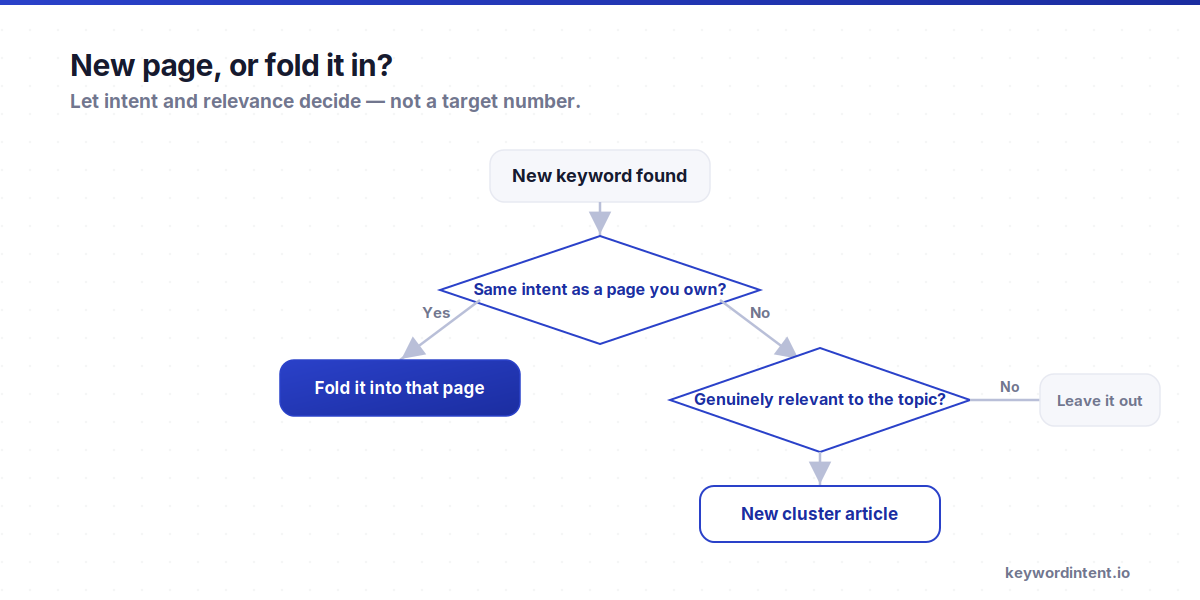
Not every subtopic needs its own article. Some belong inside the pillar as a section. The cleaner you are about this call, the less filler you produce. Three questions usually settle it.
- Is the intent distinct? If the subtopic answers a different question than the pillar and its existing clusters, it can stand as its own page.
- Does the SERP treat it separately? Open the results. If the keyword pulls up dedicated pages rather than sections of broader guides, that is Google telling you it deserves its own page.
- Is there enough depth to fill a page? If you can only write three honest paragraphs, it is a section of the pillar or an existing cluster, not a standalone article.
And as the topical authority piece notes, you may not need a separate page for a subtopic the pillar already ranks for. Forcing one there does not add coverage; it splits your own authority across two pages that now compete.
When a Topic Is Actually Done
Without a quota, people worry they will never know when to stop. In practice the topic tells you. You have covered it when three things happen at once.
- New keywords you find are just rephrasings of pages you already planned, not new angles.
- The search results for fresh terms keep showing the same handful of intents you have already mapped.
- Expansion tools start returning close variants instead of genuinely new questions.
That convergence is the natural stopping point. It might land at eighteen pages or at sixty. Either way it is a real boundary you can point to, which is more than an arbitrary fifty can ever give you.
If You're Genuinely Short on Keywords
Sometimes the problem is not the quota. It is that you have not expanded the topic properly, and you are running out at thirty because you only checked one tool. Before you conclude a topic is exhausted, run it through every cheap source: autocomplete, People Also Ask, competitor pages, and the questions people actually ask on Reddit and in forums. Our guide to keyword research without paid tools walks through the full set.
But if you have honestly expanded and the topic still only supports a smaller number of real pages, that is your answer. Twenty strong, well-aimed articles will out-rank fifty where half are filler. The smaller, denser cluster wins because every page in it earns its place.
A Pillar, Not a Pile
The whole point of a pillar and its clusters is to show Google you cover a subject completely and deeply. Padding works against that. A pile of thin pages signals breadth without depth, which is the opposite of the authority you are trying to build. The structure only helps when every page is something a searcher genuinely needed.
So the count is an output, never a target. Decide the topic, find every relevant keyword, cluster by intent, and the number of pages reveals itself. If that number is smaller than the brief asked for, the brief was wrong, not the topic.
A Count-Last Workflow
Put the count at the end of the process instead of the start and the whole thing stops fighting you.
- Pick one pillar topic that maps to a real part of the business, and forget the article count for now.
- Build an exhaustive keyword list. Expand a seed on the keyword tool using the wildcard filters for questions, comparisons, and alternatives.
- Filter every keyword for relevance and intent. Drop anything that does not match the topic or the searcher you want.
- Cluster the survivors by intent in the Keyword Grouping Tool so variations merge and distinct intents separate.
- For each group, decide page or fold using intent, the SERP, and available depth. The number of standalone groups is your article count.
- Write each page to be the best answer for its group, then measure clicks per query and prune anything that turns out thin.
Frequently Asked Questions
Is a fixed number of articles per pillar a good strategy?
No. A fixed quota forces you to either pad with filler when you run short or stop early when the topic has more to give. Find every relevant keyword for the topic first, cluster by intent, and let the real number of groups decide how many articles the pillar supports.
How many supporting articles does a pillar page need?
However many distinct, relevant intents the topic contains. Deep topics can support sixty pages; narrow ones run out of honest material at fifteen. Both are correct. The count is an output of the research, not a target you set in advance.
Should I publish keywords that show zero search volume?
Sometimes. A specific, on-topic long-tail that reads zero because it is rare can be a genuine opportunity. A loosely related phrase with no demand and no clear intent is filler. The test is whether a real person would type it to solve a problem your page answers, not the volume figure.
How do I know when I have found enough keywords?
When new finds are just rephrasings of pages you already planned, the search results keep repeating intents you have mapped, and expansion tools return close variants instead of new questions. That convergence is the natural stopping point, wherever it lands.
What if my manager insists on a set number of articles?
Do the research count-last and show the work. Bring the clustered list and let the groups make the case. If the topic honestly supports twenty strong pages rather than fifty, a smaller dense cluster that ranks is an easier result to defend than fifty pages where half are filler that never gets traffic.
Does more content always help rankings?
No. More content is more chances to rank only when each page is relevant and deep. Thin filler pages dilute internal links, compete with your stronger pages, and signal breadth without depth. Fewer strong pages beat a larger pile of weak ones.
Stop counting keywords and start covering topics. Pick the pillar, find every relevant keyword it actually has, filter for relevance and intent, then cluster the list and let the real groups set your article count. Start by expanding a seed on the keyword tool and grouping the result in the Keyword Grouping Tool. The number you were chasing was in the data all along.